
How to choose the best IPTV player for an LG TV
An LG TV has no IPTV player built in, so the app you pick decides how your subscription looks and works every evening. Many apps in LG Content Store play an M3U link; far fewer make the TV guide, catch-up, films and a 30,000-channel playlist pleasant to use with a remote. Here are the ten things worth checking, and how Flumio handles each of them.
A player app never includes channels. Your channels come from your IPTV provider as a playlist link or an Xtream Codes login. Be careful with any app that promises channels for free.
1. Both M3U links and Xtream Codes logins
Providers hand out either a playlist link (M3U) or a server, username and password (Xtream Codes). A good player accepts both, so you're not stuck when you change provider. Flumio takes either one: see adding an M3U playlist and setting up Xtream Codes, or which one to use.
2. An easy way to enter the link
Typing a 120-character link with the remote is where many people give up. Look for an app that lets you send the link, the login or even a playlist file from your phone. In Flumio you scan a QR code on the TV and paste the link on the phone: putting an M3U file on an LG TV.

3. Copes with big playlists
Full subscriptions often list tens of thousands of channels, films and episodes. On a TV that can mean a long wait at every start, or an app that closes. Check how the app starts the second time. Flumio saves the list on the TV and opens with it straight away, refreshes it in the background, and lets you load only live channels if you don't need films and series.
4. A real TV guide
The programme on air next to every channel, and a grid you can scroll through the evening, is what makes IPTV feel like television. The guide should load from the link in your playlist without extra setup, and let you correct the time if it's off. Flumio does both: TV guide not showing?
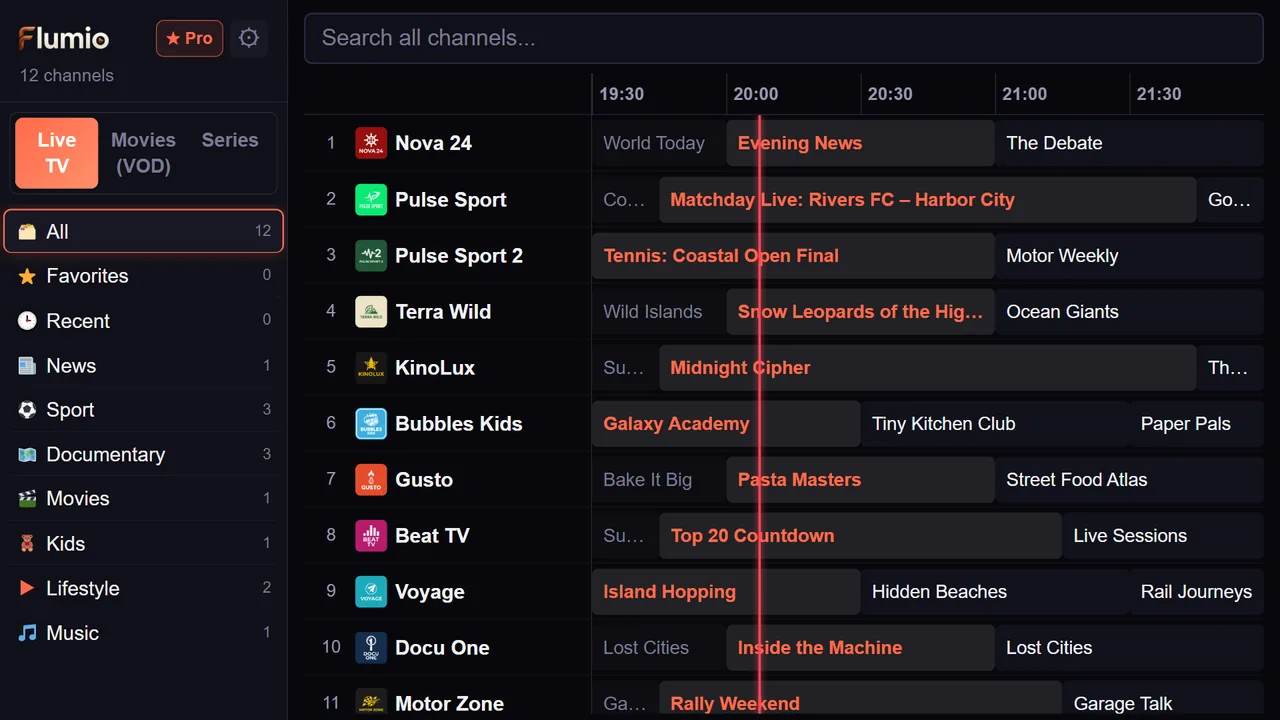
5. Catch-up and rewinding live TV
Many providers keep an archive of the last few days on some channels. A player that supports it lets you go back to the start of a programme on air, or replay one that finished yesterday. Flumio reads the archive details from your playlist, with nothing to set up:rewind and catch-up on an LG TV.
6. Films and series that remember where you stopped
If your subscription includes films and series, look for posters, seasons and episodes laid out properly, a resume point for every title and a Continue watching row. Flumio also plays the next episode on its own: films and series on an LG TV.
7. Subtitles and audio tracks
Channels and films often carry several languages. A good player lets you switch them during playback, shift subtitles that are early or late, and remembers your choice for next time. See subtitles and audio language on an LG TV.
8. Playback that uses the TV's own hardware
4K channels are usually HEVC with Dolby sound. Apps that decode video in software, or through the TV's web engine, often show a black screen or play without sound on such channels. Flumio hands the stream to the TV's own video player, the same one LG's built-in apps use, so it plays what the TV itself can decode: 4K IPTV on an LG TV.
It should also handle a channel that stops. Flumio reconnects once, and if the channel is really down it moves to the next one instead of leaving a black screen: IPTV not working?
9. Parental lock
With children at home, you want adult or late-night categories behind a PIN, and ideally the option to hide them completely. In Flumio this works in the free version too: parental controls on an LG TV.
10. Honest about cost, no ads
Check what stays free after the trial and whether the app shows ads. Flumio has no ads. Every new install gets 7 days of Flumio Pro; after that, live TV from one playlist stays free, and Pro adds unlimited playlists, films and series, the TV guide and catch-up. You don't need an account to start.
A quick test before you decide
- Install the app from LG Content Store and add your playlist.
- Close the app and open it again: it should come back to your channels quickly.
- Switch between five channels with Channel + / −. Each one should start within a couple of seconds.
- Open the TV guide and check the programme times against a channel you know.
- Try a 4K channel and a film with several audio languages, if your subscription has them.
Questions
Does an LG TV have a built-in IPTV player?
No. webOS can't open an M3U playlist on its own; you need an app from LG Content Store. Some LG TVs offer free channels from LG itself, but that's a separate service and doesn't play your IPTV subscription.
Which LG TVs can run Flumio?
LG Smart TVs with webOS 5.0 or newer, which means most models from 2020 onwards. See the complete guide to IPTV on an LG TV.
Is a paid IPTV player better than a free one?
Not by default. What matters is how the app handles your playlist, the guide and playback. Use the trial to try it with your own subscription before paying for anything.
Can I use the same player on my phone?
Flumio is also on Google Play for Android phones. Playlists are added on each device separately.